
5. Agent scoped tools triage
This experiment addresses: https://github.com/fullsend-ai/fullsend/issues/101
Counterpart to experiment 67 which demonstrates the wrapper/pure-I/O approach. This experiment demonstrates an alternative using established patterns from Claude Code and OpenCode: skills define capabilities, agents execute them with scoped tools, and a top-level agent orchestrates the flow.
What this experiment covers
- Agent-driven orchestration: A top-level agent spawns subagents dynamically based on a prompt and available tools — it decides which subagents to invoke, in what order, and whether to skip steps based on context.
- Every agent is sandboxed: Both the orchestrator and every subagent run inside their own OpenShell sandbox. No agent runs unsandboxed.
- Tools are scoped per agent via skills: Each agent has access only to the tools its skill declares. Subagents get read-only tools; only the orchestrator has write tools. This is enforced at both the runtime level (agent/skill definitions) and the infrastructure level (sandbox policies).
- Sensitive tokens are isolated from agents: The GitHub token lives exclusively in the host-side GitHub REST server process — agents never see
GH_TOKENin their environment. They interact with GitHub only through the REST API viacurl, and L7 network policies enforce which methods and paths each agent can reach. Even if an agent is compromised, it has no credential to exfiltrate. - Per-agent sandbox guardrails covering filesystem and network: Each sandbox has a tailored policy that restricts both filesystem access (read-only vs. read-write paths) and network egress (which hosts, ports, HTTP methods, and API paths are allowed). The orchestrator can POST comments; subagents can only GET. One subagent can fetch external URLs; another can read the local filesystem; the rest have no access to either.
Concepts
Skills
A skill is a reusable capability definition: a prompt and a set of allowed tools. Skills define what to do, not how to execute it. They live as SKILL.md files following the Agent Skills open standard.
Agents
An agent is an execution context that uses one skill. It defines how to run: which model, which tools, what permissions. Each agent does one job.
Top-level agent
A top-level agent orchestrates subagents. It has its own tools (in this case, write tools for commenting and labeling) and decides which subagents to invoke and in what order based on context. This gives flexibility — the top-level agent can skip steps, change order, or adapt based on findings.
Architecture
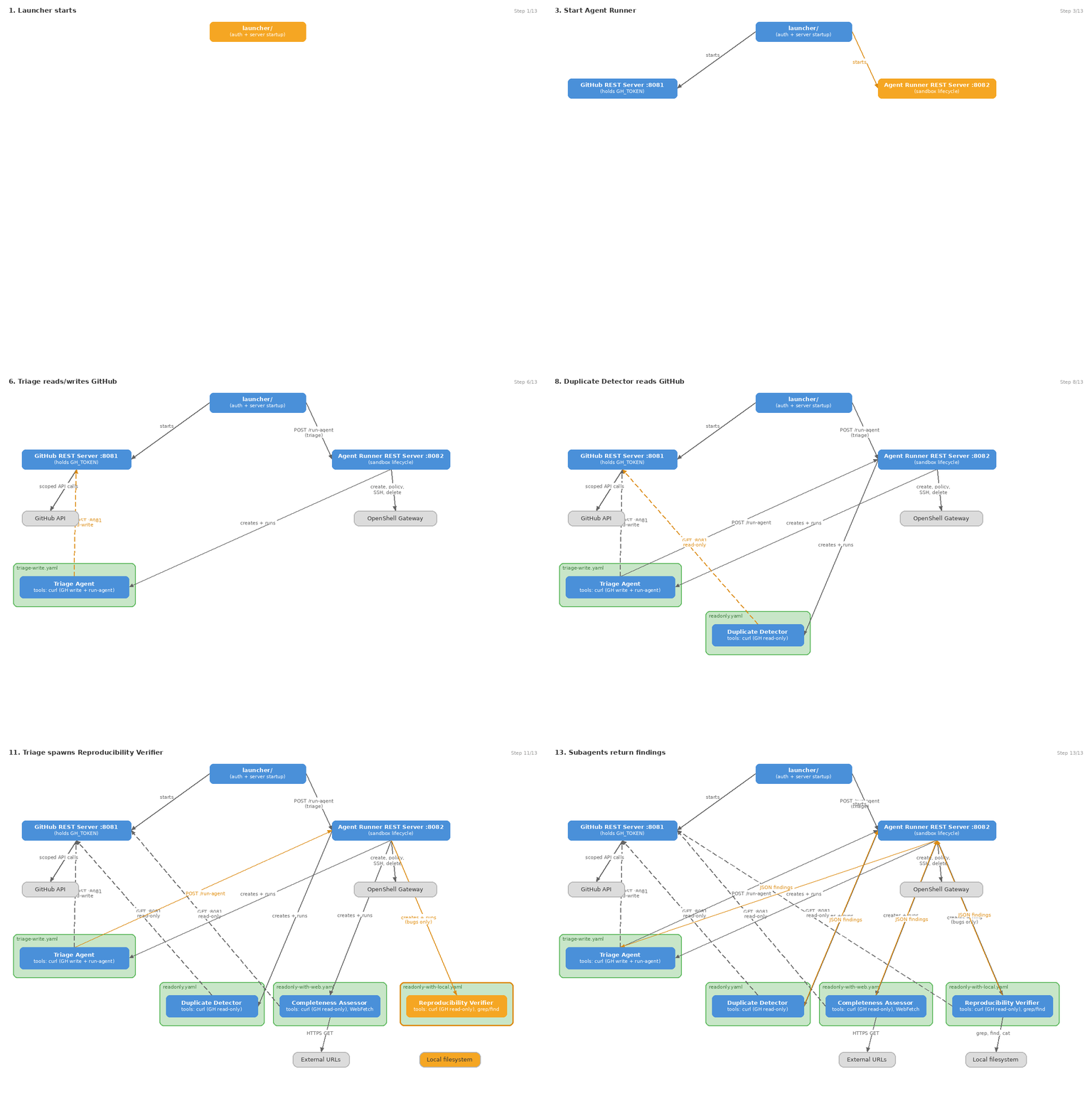
Each agent runs in its own OpenShell sandbox with a tailored network policy. The sandbox enforces at the infrastructure level what the runtime tool scoping enforces at the application level — defense in depth.
File structure
experiments/101-agent-scoped-tools/
├── README.md
├── requirements.txt
├── launcher/                                # Python package — run with: python -m launcher
│   ├── __init__.py                          # Shared constants (ports)
│   ├── __main__.py                          # CLI entry point (argparse)
│   ├── auth.py                              # GitHub token acquisition helpers
│   └── orchestrator.py                      # Starts servers, launches triage via agent runner
├── skills/
│   ├── triage-coordination/SKILL.md         # Skill: orchestrate triage flow
│   ├── detect-duplicates/SKILL.md           # Skill: find duplicate issues
│   ├── assess-completeness/SKILL.md         # Skill: evaluate issue quality + fetch external links
│   └── verify-reproducibility/SKILL.md      # Skill: check bug reproducibility
├── agents/
│   ├── triage.md                            # Top-level agent (orchestrator + writes)
│   ├── duplicate-detector.md                # Subagent using detect-duplicates skill
│   ├── completeness-assessor.md             # Subagent using assess-completeness skill
│   └── reproducibility-verifier.md          # Subagent using verify-reproducibility skill
├── policies/
│   ├── triage-write.yaml                    # OpenShell policy: read + write issues
│   ├── readonly.yaml                        # OpenShell policy: read-only GitHub API
│   ├── readonly-with-web.yaml               # OpenShell policy: read-only + HTTPS GET anywhere
│   └── readonly-with-local.yaml             # OpenShell policy: read-only + local filesystem
└── tools/
    ├── gh-server/
    │   └── gh_server.py                     # GitHub REST server: holds token, exposes scoped endpoints
    └── agent-runner/
        ├── agent_runner_server.py           # Agent runner REST server: POST /run-agent endpoint
        ├── runner.py                        # Agent runner: sandbox lifecycle for all agents
        └── sandbox.py                       # OpenShell primitives (create, delete, policy, SSH, SCP)
How it works
launcher/authenticates as a GitHub App, generates a repo-scoped token, starts the GitHub REST server (:8081) and agent runner REST server (:8082), and launches the triage agent via the agent runner in its own OpenShell sandbox- The triage agent reads the issue via the GitHub REST server, then decides which subagents to invoke via
curlto the agent runner:- Always runs duplicate-detector and completeness-assessor
- Runs reproducibility-verifier only for bug reports
- Can skip checks if a high-confidence duplicate is found
- Each subagent is created by the agent runner in a fresh sandbox with its own policy, runs with read-only tools, and returns structured findings
- The triage agent collects findings, applies labels, and posts a triage summary comment
The top-level agent is the only one with write tools (comment_issue, add_label). Subagents can only read. This enforces a clear separation: subagents analyze, the orchestrator acts.
Key design decisions
Skills are portable
Skills follow the Agent Skills open standard. The same SKILL.md works in Claude Code, OpenCode, or any compatible runtime. They define what to do without coupling to a vendor.
One agent, one skill
Each subagent performs exactly one skill. This keeps agents focused, makes them independently testable, and allows organizations to override specific agents without affecting others.
Top-level agent is flexible
Unlike a declarative pipeline, the top-level agent (an LLM) decides the order and whether to skip steps. It can adapt: if duplicate detection returns high confidence, it may skip completeness assessment. This flexibility is the value of having an agent as orchestrator.
Subagents only read, orchestrator writes
Subagents have read-only tools and return JSON. Only the top-level agent has write tools (comment_issue, add_label). This means:
- A compromised subagent can't write to the issue
- Write logic is centralized and auditable
- The triage comment format is controlled by one agent
GitHub REST server holds credentials
The token lives in the GitHub REST server process on the host. Neither the top-level agent nor subagents have GH_TOKEN in their environment. They interact with GitHub exclusively through curl to the REST server, which validates every request. L7 network policies enforce which HTTP methods and paths each agent can reach (ADR 0004).
Key differences from experiment 67
| Aspect | Experiment 67 (wrapper) | This experiment (scoped tools) |
|---|---|---|
| Agent has GH_TOKEN | Yes (in env) | No |
| Who writes to GitHub | Agent (unrestricted) | Top-level agent only (scoped tools) |
| Agent structure | Single LLM call | Top-level agent + subagents |
| Subagent capabilities | N/A | Read-only, one skill each |
| Orchestration | N/A | Top-level agent decides flow |
| Skill portability | N/A | Standard SKILL.md format |
| Customization per org | Rewrite prompt | Override specific skills/agents |
Prerequisites
Vertex AI service account
This experiment uses Claude via Vertex AI (Google Cloud). You need a GCP service account with the Vertex AI API enabled.
Create a service account in your GCP project (or use an existing one) with the
Vertex AI Userrole (roles/aiplatform.user).Create a JSON key for the service account:
bashgcloud iam service-accounts keys create /path/to/credentials.json \ --iam-account SA_NAME@PROJECT_ID.iam.gserviceaccount.comConfigure GitHub Actions secrets and variables. This experiment is designed to run in GitHub Actions, so the credentials must be available to the workflow runner:
Type Name Value Secret GCP_SA_KEY_JSONThe full JSON content of the service account key file Variable ANTHROPIC_VERTEX_PROJECT_IDYour GCP project ID Variable CLOUD_ML_REGIONVertex AI region (e.g. us-east5)The workflow should write the secret to a temporary file and export the environment variables:
yaml- name: Set up Vertex AI credentials run: | echo "$GCP_SA_KEY_JSON" > /tmp/gcp_credentials.json echo "GOOGLE_APPLICATION_CREDENTIALS=/tmp/gcp_credentials.json" >> "$GITHUB_ENV" echo "CLAUDE_CODE_USE_VERTEX=1" >> "$GITHUB_ENV" echo "ANTHROPIC_VERTEX_PROJECT_ID=${{ vars.ANTHROPIC_VERTEX_PROJECT_ID }}" >> "$GITHUB_ENV" echo "CLOUD_ML_REGION=${{ vars.CLOUD_ML_REGION }}" >> "$GITHUB_ENV" env: GCP_SA_KEY_JSON: ${{ secrets.GCP_SA_KEY_JSON }}
The agent runner automatically copies the credentials file into each sandbox and forwards these environment variables, so agents inside sandboxes authenticate without ever seeing the raw key material at rest. Sandbox network policies must allow *.googleapis.com:443 for Vertex AI API calls.
Other prerequisites
- OpenShell installed and gateway running (
openshell statusshould succeed) - Claude CLI (
claude) onPATH - Python 3.11+ with
pip install -r requirements.txt - GitHub App credentials (PEM key, client ID, installation ID) or a
ghCLI session (gh auth login)
Usage
pip install -r requirements.txt

# Vertex AI credentials must be configured (see Prerequisites above)

python -m launcher \
  --pem /path/to/app.pem \
  --client-id YOUR_CLIENT_ID \
  --installation-id 12345 \
  --repo org/repo \
  --issue 42
Compatibility
The file formats follow Claude Code conventions (the stricter of the two) with notes on OpenCode differences.
Skills (SKILL.md)
| Feature | Claude Code | OpenCode |
|---|---|---|
name | Supported | Supported |
description | Supported | Supported |
allowed-tools | Supported (scopes tools when skill is active) | Not supported (tool scoping is done at agent level) |
| Markdown body | Skill instructions | Skill instructions |
| Directory structure | .claude/skills/<name>/SKILL.md | .opencode/skills/<name>/SKILL.md |
Agents (.md files)
| Feature | Claude Code | OpenCode |
|---|---|---|
name, description | Required | Required |
tools | Comma-separated string | Configured via permission object |
model | sonnet, haiku, opus, or full ID | provider/model-id format |
skills | List of skill names preloaded into context | Not in agent frontmatter (agents invoke skills via tool) |
Agent(name, ...) in tools | Restricts which subagents can be spawned | Not supported (uses Task tool) |
What this means in practice
- Skills are fully portable between both runtimes. The
allowed-toolsfield is a no-op in OpenCode but doesn't break parsing. - Agent definitions use Claude Code format. To use with OpenCode, the
toolsfield would need to be translated to OpenCode'spermissionobject, andskillswould need to be invoked via the skill tool rather than preloaded. - GitHub REST server (
tools/gh-server/gh_server.py) is a plain REST API that proxies GitHub operations. It runs on the host and agents call it viacurlthroughhost.docker.internal. L7 network policies enforce per-agent access (GET-only for subagents, GET+POST for triage). - Agent runner (
tools/agent-runner/agent_runner_server.py) is a plain REST API that the triage agent calls viacurlto spawn subagents in sandboxes.
Security layers
Skill-level (capability scoping):
- Each skill declares its allowed tools
- Subagents can only use the tools their skill permits
- Skills are reviewed and version-controlled
Agent-level (execution isolation):
- Each subagent runs in clean context (no leaking between subagents)
- Subagents have read-only tools — cannot write to issues
- Only the top-level agent has write tools
- Subagents are invoked via the agent runner REST server which creates each in its own OpenShell sandbox
GitHub REST server (credential isolation):
- Token lives only in the GitHub REST server process on the host
- Tools validate target repo matches the allowed repo
- Credential scanning on comment bodies before posting
Sandbox (infrastructure enforcement):
- Agent processes have no
GH_TOKENin their environment - Network egress restricted to the REST server on the host (
host.docker.internal:8081), with L7 policy enforcing method/path restrictions per agent - Agents have no token — even if they bypass runtime tool restrictions, they cannot authenticate to GitHub directly
Per-agent sandboxing with OpenShell
Each agent runs in its own OpenShell sandbox with a tailored network policy. The sandbox field in each agent's definition points to its policy file — the agent definition is the single source of truth.
The triage agent invokes subagents via curl to the agent runner REST API (POST /run-agent), which delegates to the host-side agent runner. The agent runner:
- Reads the
sandboxfield from the target agent's.mdfrontmatter - Creates a persistent OpenShell sandbox
- Applies the custom policy via
policy set --wait(replaces built-in defaults) - Bootstraps the sandbox (copies claude binary, agent/skill definitions, credentials)
- Runs the subagent inside the sandbox via SSH
- Extracts transcripts and cleans up the sandbox on exit
This approach was chosen because SubagentStart hooks do not fire in Claude Code's --print mode (required for CI). By using a REST API backed by a host-side server, the triage agent delegates sandbox management without needing direct access to the OpenShell gateway (which is not available from inside a sandbox).
Sandbox policies per agent
| Agent | Policy | GitHub API | External web | Local FS |
|---|---|---|---|---|
| triage | triage-write.yaml | GET+POST on /repos/{owner}/{repo}/issues/{number}, comments, labels | No (+ agent runner :8082) | No |
| duplicate-detector | readonly.yaml | GET on /repos/{owner}/{repo}/issues/* + /search/issues | No | No |
| completeness-assessor | readonly-with-web.yaml | GET on /repos/{owner}/{repo}/issues/{number} | HTTPS to *.io, *.com, *.org, *.dev | No |
| reproducibility-verifier | readonly-with-local.yaml | GET on /repos/{owner}/{repo}/issues/{number} | No | Read-only |
Policies use OpenShell's rules field with tls: terminate for L7 path-level enforcement on REST endpoints, and protocol: tcp with specific TLD patterns for broad web access. Placeholders ({{OWNER}}, {{REPO_NAME}}, {{ISSUE_NUMBER}}) in policy templates are substituted at runtime by the agent runner.
Defense in depth
Each layer enforces independently:
- Runtime (Claude/OpenCode) enforces
toolsfrom agent frontmatter - GitHub REST server enforces repo scoping and input validation
- OpenShell sandbox enforces network-level access per agent
A compromised read-only subagent can't write to GitHub even if it somehow bypasses the runtime tool restriction — the sandbox's L7 network policy blocks POST requests at the network layer, and the agent has no GitHub token to use directly.
CI integration
The agent runner approach works in both interactive and --print mode. In CI (GitHub Actions), the workflow installs OpenShell, starts a gateway, and the agent runner REST server handles sandbox lifecycle for each subagent. OpenShell is required — if it's unavailable or the gateway isn't running, the agent runner fails hard rather than falling back to unsandboxed execution.
Findings from testing
Tested on maruiz93/kubearchive-test with real issues from the kubearchive project, using Vertex AI (Claude via Google Cloud) in GitHub Actions.
What worked
- Multi-agent triage flow: The triage agent successfully orchestrated duplicate-detector, completeness-assessor, and reproducibility-verifier subagents, collected their findings, applied labels, and posted triage summaries.
- OpenShell sandbox enforcement in CI: Gateway starts on GitHub Actions runners (which have Docker), sandbox creation and policy application work, L7 enforcement verified (GET allowed, POST returns 403).
- Credential isolation: The GitHub token lives only in the GitHub REST server process on the host. Agents have no
GH_TOKENin their environment. - Strict sandbox enforcement: OpenShell is required — the agent runner fails hard if OpenShell is unavailable or sandbox creation fails, preventing unsandboxed execution.
What required workarounds
--printmode and hooks:SubagentStarthooks do not fire in Claude Code's--printmode, which is required for CI. Workaround: use a REST API (POST /run-agent) backed by a host-side agent runner server instead of hooks to manage sandboxed subagent execution.- OpenShell
sandbox createis always interactive: There is no one-shot command execution mode. Workaround: usetimeoutto create the sandbox, thenpolicy set --waitto apply the policy, then SSH to run commands non-interactively. - Policy must be applied after creation: Passing
--policyatsandbox createtime does not replace the built-in default policies. The custom policy must be applied separately viaopenshell policy set <name> --policy <file> --wait. - Cold-start race condition: The first sandbox after gateway start can timeout during policy application while the policy engine initializes. Workaround: retry
policy setup to 3 times with a delay. - Agent early stopping in
--printmode: When the triage agent's first tool call failed, the agent would abandon the approach and try alternative strategies, then stop after one step. Fix: strengthen the triage agent prompt to require completing all steps before producing output, and ensure the REST API is reliable. - SSRF guard blocks host access: OpenShell blocks all RFC 1918 private IPs by default (SSRF protection). Connections to
host.docker.internalresolve to a private IP, so the proxy returns 502 Bad Gateway. Fix: addallowed_ipswith the exact host IP ({{HOST_IP}}/32) to policy endpoints that need host access. The agent runner resolveshost.docker.internalat runtime and substitutes the placeholder, so only the specific host IP is allowed — not the entire RFC 1918 space. - Vertex AI credentials in sandboxes: Claude CLI inside sandboxes needs Vertex AI authentication, but credentials don't carry into sandboxes automatically. Fix: copy the GCP credentials file into each sandbox and export
CLAUDE_CODE_USE_VERTEX,ANTHROPIC_VERTEX_PROJECT_ID,CLOUD_ML_REGION, andGOOGLE_APPLICATION_CREDENTIALSenv vars. Sandbox policies also need*.googleapis.com:443access. - Sandbox readiness race:
openshell sandbox createreturns after timeout (exit 124) while the image is still pulling. Ifpolicy setruns before the sandbox is ready, it times out. Fix: pollopenshell sandbox getfor "Ready" status before applying policies.
OpenShell policy format
OpenShell policies do not support:
- Variable substitution (
${REPO},${ISSUE_NUMBER}): Policy paths are literal strings, not templates. Workaround: the agent runner substitutes{{OWNER}},{{REPO_NAME}},{{ISSUE_NUMBER}}, and{{HOST_IP}}placeholders at runtime before applying the policy, enabling per-repo, per-issue path scoping and host-specific IP allowlisting. - Wildcard host
**: L7 policies rejecthost: "**". Use specific TLD patterns like*.com,*.ioinstead, withprotocol: tcp(L4) for broad access. - Custom HTTP method rules: The
rulesfield withmethodandpathrequirestls: terminatefor L7 inspection. Alternatively,access: read-onlyoraccess: read-writecan be used for simpler L4 enforcement without path restrictions. - Private IPs blocked by default: The proxy has built-in SSRF protection that rejects connections to RFC 1918 addresses. To allow host access (e.g., REST servers on
host.docker.internal), addallowed_ipswith the exact host IP ({{HOST_IP}}/32, resolved at runtime) to the endpoint definition.
Limitations
- OpenShell requires Docker (or rootful Podman) and a gateway: The gateway bootstraps a local k3s cluster. This works on GitHub Actions runners and locally with rootful Podman (requires explicit
DOCKER_HOST), but not with rootless Podman (needs/dev/kmsg) or on restricted corporate networks that block container DNS. - Per-subagent container overhead: Each sandboxed subagent creates a new container, which adds ~10-15s overhead per subagent for sandbox creation, policy application, and SSH setup.
- Agent autonomy vs. determinism: The triage agent (an LLM) sometimes improvises — for example, inspecting code itself instead of delegating to the reproducibility-verifier. Stronger prompting helps but doesn't guarantee deterministic behavior. This is a fundamental trade-off of using an LLM as orchestrator vs. a declarative pipeline.